Skip Navigation

Posts
75
Comments
690
Joined
3 yr. ago

  • Mint is very, very stable. However, not all hardware is compatible, especially since Mint is using older libraries. For most people, Mint is the best solution. For your hardware, it seems to be Debian-Unstable. I personally use both and I'm happy with both.

  • Deleted

    Permanently Deleted

    Jump
  • Linux user since 1998 or 99. Debian-Testing for my desktops, Mint for my laptops. I like things that work well with a GUI (I dislike the terminal, despite being well familiar with it), without bad surprises (Debian-Testing is surprisingly stable).

  • RTFM

    Jump
  • Ι must say that Arch Linux's wiki pages are easily understood. But man pages are not. I can't follow the standard manual format. Just like with IKEA instructions, they just don't make sense to me. My brain is like that. But Arch Linux pages are good.

  • Deleted Locked

    Permanently Deleted

    Jump
  • Different OS, different apps. When you move to another OS, you move your apps too, not expecting to run everything Windows does. If you really want to play that game, stay on Windows. Although you probably did something wrong, since others can play cyberpunk fine (maybe not the cracked version though, or a special pack for it -- just vanilla game).

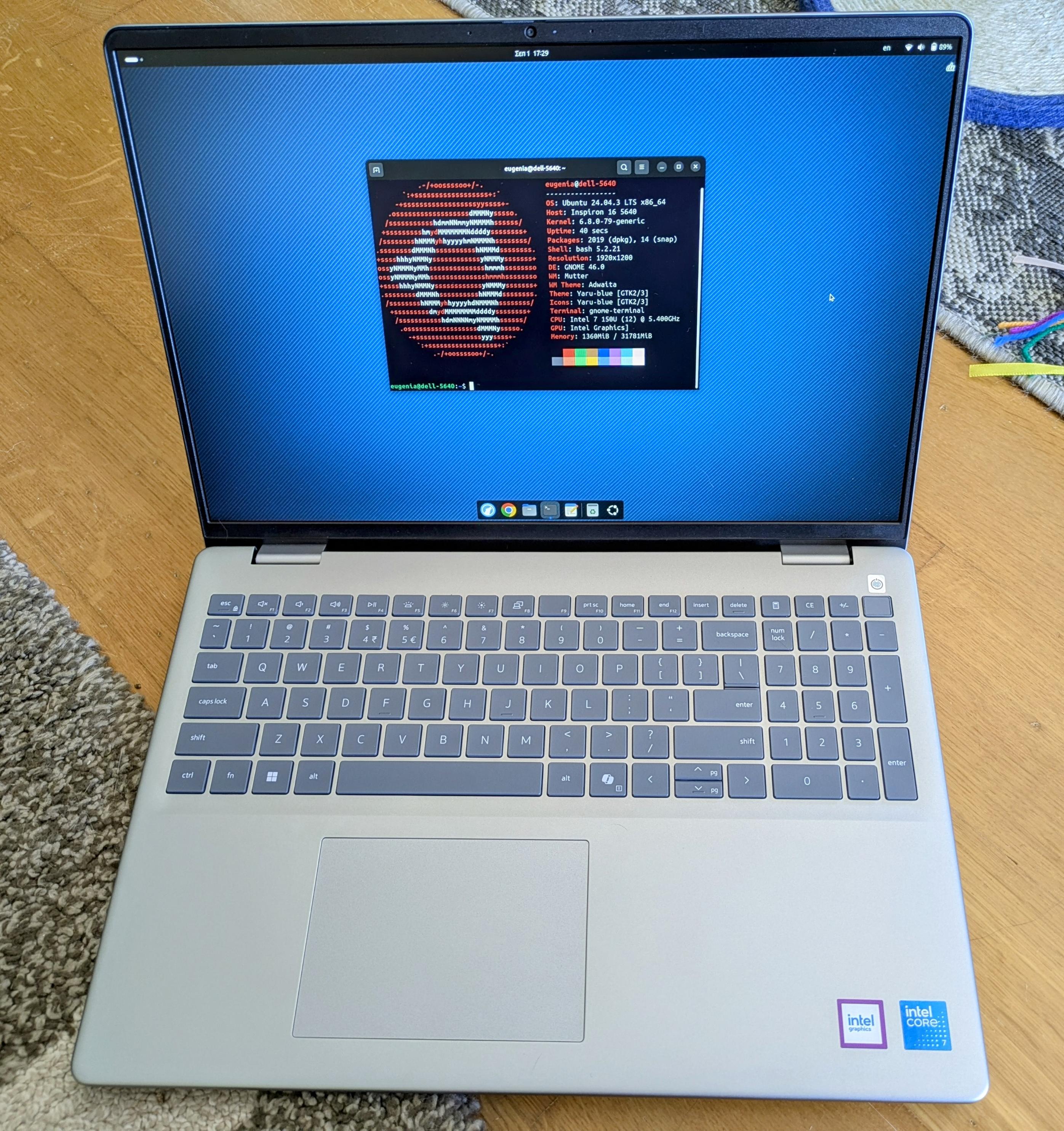
  • If you want a compatible laptop, you get one that has a version that comes with Linux, without major kernel changes. For example, the DELL laptops. The DELL laptops get hate, but they are tested against Linux. I personally got the 5640: https://files.mastodon.social/media_attachments/files/115/129/776/310/532/073/original/ffe65da00bfd0b39.jpg It now runs Mint and Debian-Testing.

    I paid just $900 euros with 32GB of RAM, and my husband got the same with 64GB of RAM for $1000 here in Greece. Everything works 100%, except touchpad's palm rejection (I made a bug report about it).

  • Deleted

    Permanently Deleted

    Jump
  • The ability to upgrade my cameras' firmwares, as it requires specialized Win/Mac utilities. Other than that, nothing.

  • Deleted

    Permanently Deleted

    Jump
  • Avoid. It's mostly games that work well. Use open source alternatives instead.

  • It's very simple.

    You simply switch your apps too, not just the OS. Everyone thinks that they can switch the OS 1:1, but it's not like that. You will never be happy if you expect the same apps on all the OSes. Instead of photoshop, you use Gimp. Instead of Illustrator, you use Inkscape. Instead of resolve/premiere, you use kdenlive. And so on. You will have to invest some time to relearn not just the OS, but the apps too.

  • Same issue on ubuntu...

  • I like this, because I'm on a slow line here in Greece, and pretty much every time there's an update, the linux-firmware package is 600 MB, which is massive to download.

  • GUIs

    Jump
  • Being using computers since 1992. I learned with DOS and SCO Unix.

    I prefer GUIs, thank you very much.

    Even when the only available option for me was Windows 3.1, I still preferred it over the CMD.

  • I have tried to get... addicted to this short form video thing (through IG reels, and Youtube shorts, I don't have tiktok), without success. I just don't see what people find in it. Sure, it's fun for about 5 minutes, no more than that. I use IG to follow my favorite artists only, and youtube for recipes, philosophical conversations, NDE reports, and other metaphysical stuff. I can't stand people dancing or AI cats baking bread.

  • Ok, so, here it is: If you just want to cut stuff, without much fanfare, then these four are your best bet:

    1. LosslessCut: https://github.com/mifi/lossless-cut possibly what you're looking for for most things, download the .appimage for x86
    2. Shutter Encoder It just cuts and exports. https://www.shutterencoder.com/
    3. Video Trimmer, get it on flathub. This one is newer.
    4. https://avidemux.sourceforge.net/ (the old guard)

    If you want to do a tiny bit more stuff, like subtitles and blurring, you MUST use a full video editor, like Shotcut and Kdenlive. These features aren't simple to implement so they're part of a full editing experience.

  • He should start with Mint, learn the system in general, and then move to Bazzite, CachyOS, Pika or Nobara, which are more game centric.

  • Yes, I agree. I personally like Cinnamon and Gnome, XFce if my PC doesn't have much ram. I don't really enjoy any of the other ones.

  • I use the cli on macos often, because some apps need to be manually signed from the terminal. Power users on windows also use the terminal. However, the best of what you ask is Linux Mint.

  • lmde does not have all the pref panels like normal mint does. I always suggest against it, especially for nvidia users.

  • Linux Mint is not a "rando ubuntu fork". It's the most reliable OS for me, along Debian-Stable. It has prefs for almost everything, sane defaults, and a clear release and support schedule. And it uses Cinnamon. I've tried everything under the sun, I always come back to Mint. It works.

  • I'd personally get the Vala book and start with that. It's more gnome-integrated and it's a great language.

  • This looks like either a driver issue, but more likely, a hardware issue. Either your nvme, or your RAM, is faulty. Run memcheck (it's a bootable thing you run to make sure your ram is ok), and I'm sure there are tests for ssds too.

  • Watercolor / Watercolour / Aquarelle Painting @lemmy.ml

    Fairy and Pixies are exchanging gifts

  • Gouache Art @lemmy.ml

    Skiing down a slope (painted with gouache)

  • Gouache Art @lemmy.ml

    Goblins stealing laundry (Greek folklore, more in description)

  • Watercolor / Watercolour / Aquarelle Painting @lemmy.ml

    The Christmas Tree Cat Lady (my watercolor)

  • Gouache Art @lemmy.ml

    Christmas carols in Greece (boat is traditional), painted with gouache

  • Gouache Art @lemmy.ml

    Happy Winter Solstice (Slavic tradition, my gouache painting)

  • Gouache Art @lemmy.ml

    Hot Cocoa (three different gouache paintings, making one long one)

  • Linux @lemmy.ml

    The impossibility of finding a Linux laptop that I like

  • Watercolor / Watercolour / Aquarelle Painting @lemmy.ml

    British Carols

  • Watercolor / Watercolour / Aquarelle Painting @lemmy.ml

    Elves placing gifts

  • Watercolor / Watercolour / Aquarelle Painting @lemmy.ml

    Baby Pixie

  • Watercolor / Watercolour / Aquarelle Painting @lemmy.ml

    St Barbara (I painted this as a gift for my mom, Barbara)

  • Gouache Art @lemmy.ml

    Back to the cabin, with gouache

  • Gouache Art @lemmy.ml

    Christmas Sheep, with gouache

  • Watercolor / Watercolour / Aquarelle Painting @lemmy.ml

    Snowy village, with watercolors

  • Watercolor / Watercolour / Aquarelle Painting @lemmy.ml

    My Easter-Christmas fusion watercolor illustration, I guess

  • Watercolor / Watercolour / Aquarelle Painting @lemmy.ml

    Snowglobe, watercolor on paper

  • Watercolor / Watercolour / Aquarelle Painting @lemmy.ml

    Little elves knitting a Christmas pullover

  • Watercolor / Watercolour / Aquarelle Painting @lemmy.ml

    Christmas tree decoration (painted with handmade watercolors)

  • Linux @lemmy.ml

    Setting up an alarm